
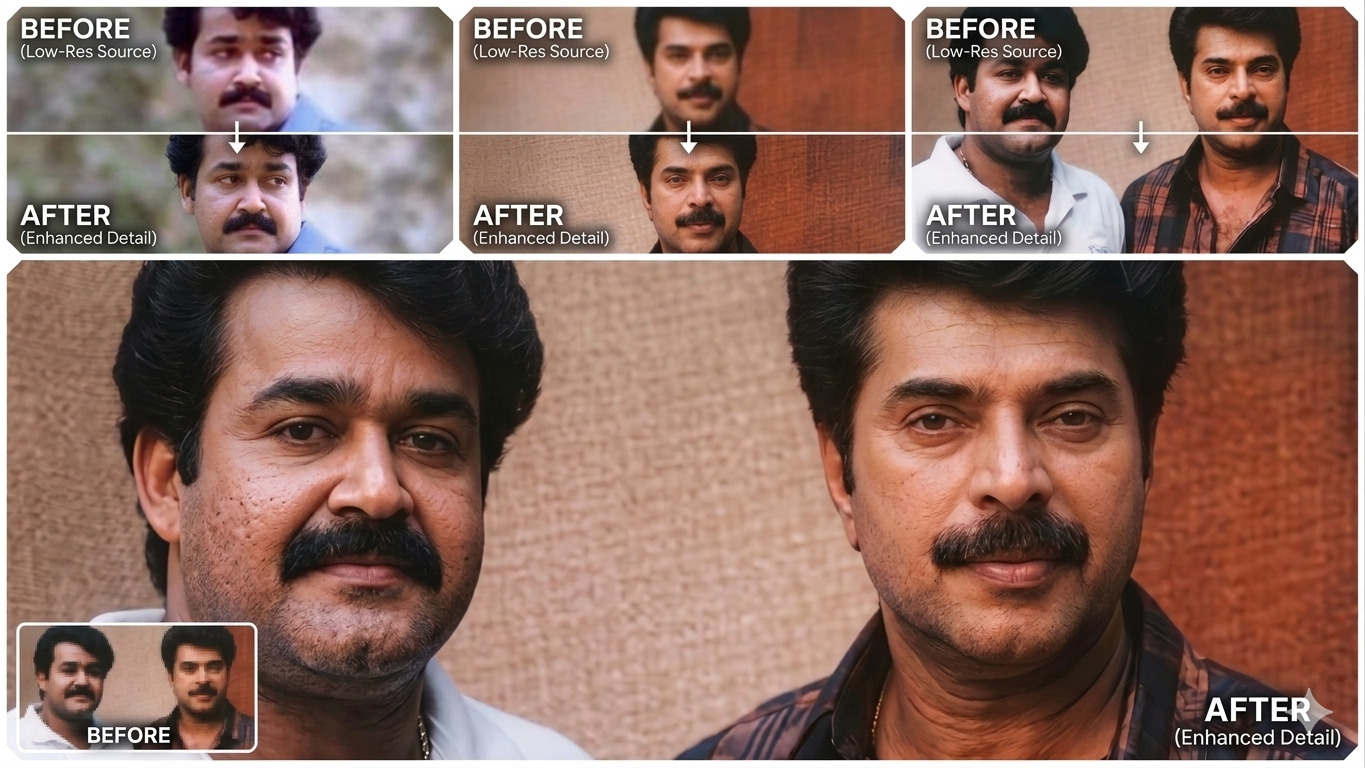
The AI Restoration Blueprint: How to Transform Low-Res Photos into 4K Masterpieces
CreativesHub
March 8, 2026
The Science of AI Upscaling
In the world of 2026 digital imaging, "Enhancing" no longer means just making an image bigger. Traditional upscalers often create a "plastic" look or change the subject's identity. This workflow uses Generative Restoration. By feeding a specific set of technical constraints into the Gemini AI engine, you are directing the model to "fill in the blanks" of low-resolution data with realistic textures like skin pores and fabric weaves, all while maintaining 100% fidelity to the original reference.
The 3-Step 4K Transformation Process
This utility is designed for maximum efficiency. Follow these steps to unlock professional-grade clarity on any mobile device:
- Copy the Blueprint: Grab the high-fidelity technical prompt provided below. This prompt acts as a "guardrail" to prevent the AI from hallucinating or distorting your features.
- Initialize Gemini: Open the Gemini app and upload your low-quality or blurry reference image.
- Execute the Command: Paste the copied prompt and send. The AI will analyze the source lighting, anatomy, and texture to generate a reconstructed 4K version.
The Master Technical Prompt
Enhance the provided reference image to ultra-high 4K resolution while maintaining 100% fidelity to the original subject. Preserve the exact facial anatomy, proportions, identity, expression, gaze, pose, camera angle, framing, and perspective with zero deviation. All elements including clothing, hair, skin texture, and background details must remain unchanged in structure, placement, and design. Restore natural micro-details such as skin pores, fine lines, hair strands, eyelashes, fabric weave, stitching, and material edges while maintaining true-to-life realism without stylization. Maintain the original color science, white balance, tonal balance, and dynamic range exactly as captured in the source image. Ensure lighting direction, intensity, contrast, and shadow behavior match the original reference precisely. Apply controlled sharpening to enhance high-frequency details. Remove compression artifacts, digital noise, and blur while preserving authentic textures. Avoid any artificial processing such as skin smoothing, plastic skin effects, or artificial glow. Facial features must remain consistent with accurate anatomy and stable edges across the image. Negative constraints: No warping, no face drift, no anatomy changes, no added or missing features, no altered hands, no perspective shift, no distortion, no text or graphics, no hallucinated details, no stylized rendering. The final output must appear as true-to-life, high-end photorealism, identical to the reference image but clearer, sharper, and in higher resolution
📸 Master Your Visuals 📸
Ready to see your photos in a whole new light? Join the AI photography revolution and start building your high-definition gallery today.
Final Thoughts: Quality is No Longer a Limitation
We no longer live in an era where a blurry photo is a lost cause. By using Prompt Engineering as a technical utility, you are taking control of the pixels. Whether you are restoring an old family portrait or cleaning up a low-light snapshot, the power to create 4K photorealistic imagery is now in your pocket. The future of photography isn't about the sensor—it's about the prompt.
CreativesHub
CreativesHub admin curating inspiring digital stories, app launches, and creative tools for modern makers.